
Accepted and reward delivered
Record the Cash, potion or item that actually reached the account. This live result is stronger evidence for your account than a publisher reward table.
Redeem Karinderya codes after the tutorial, find the ticket control, read accepted or rejected results, and fix spacing, server and inventory issues.
Copy a code from the current Codes page, open the blue ticket control near the upper-right corner and submit the exact string. If the normal controls are hidden, finish the current tutorial prompt first. Read the game’s result before trying another code.
Open the current Codes deskEach step names the visible decision to make. Exact labels, prices, and timings remain tied to the interface in your current server.
If the normal controls are hidden, finish the current tutorial prompt.
Open the blue ticket or code control near the upper-right corner.
This is a Chinese-language interface reference. The table translates the visible labels; it does not claim that an English-language client uses identical text.
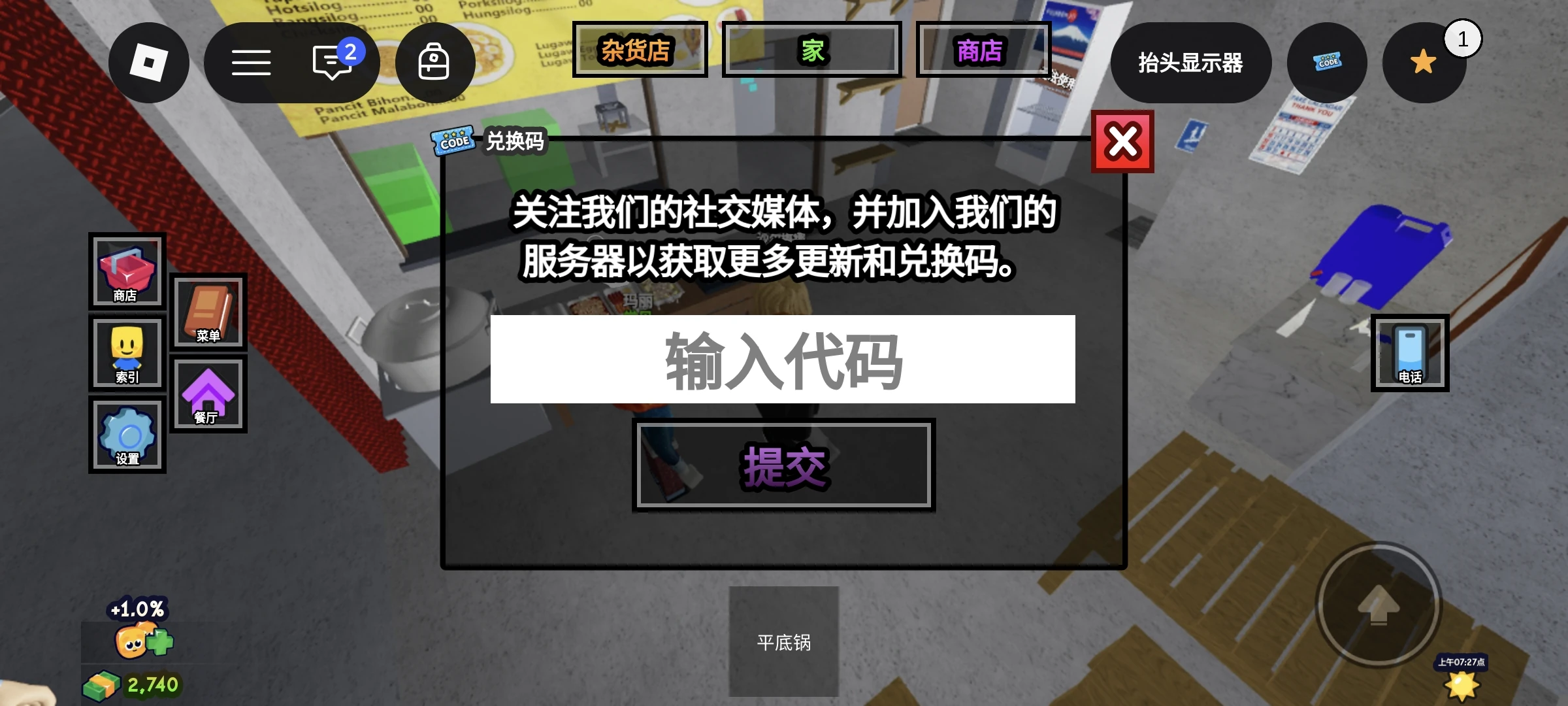
| Look for | Meaning in the pictured interface |
|---|---|
| Blue ticket icon at the upper right | The code control identified in the source record |
| 输入代码 in the white box | Enter code |
| 提交 below the box | Submit |
Enter only the code string, then read the game's response after submitting. This image shows an empty panel, not a successful claim or a reward being delivered.
The social-media message above the input does not, by itself, establish a mandatory join or follow requirement.
Paste one exact code and select Submit.
Copy 80MVISITS exactly from the current code card. Keep the letters and numbers unchanged, and remove surrounding spaces or quotation marks. Do not translate the code string.
An earlier English–Spanish comparison showed different spellings for the then-listed milestone code. That localized spelling was not tested as a redeemable code. The example is retained as a reason to copy the original string, not as a current code recommendation.
The English description showed 75MVISITS; the Spanish version displayed 75MVISITAS.
English source · Spanish source read October 17
Translation comparison reviewed: October 17, 2026. This is a source-text comparison, not a redemption test.
Tip: The copy button copies only the code string. It does not change or re-verify the code status.
Read the response, then check your balance or inventory.
Compare the related Karinderya code-screen reference and redemption steps on GamesDataHub.
Record the Cash, potion or item that actually reached the account. This live result is stronger evidence for your account than a publisher reward table.
Your account may have claimed that code before. Check the message and your inventory rather than repeatedly submitting it.
Recheck the exact string and record the message shown. The response may apply to that code and account state; a publisher list cannot override the game’s response.
Advance the opening tutorial until the normal menu controls appear. Current publisher screenshots place the code control in the upper-right area, but labels and visibility can change after updates.
Check the relevant balance or inventory before retrying. Do not assume that a conflicting reward table describes a second payout.
Rejoining once may help you compare the interface, but it does not guarantee a newer build or a successful claim.
Use the delivered inventory. Historical DECOPART1 reports disagree between a 2× Cash Potion and two Luck Potions. Historical reward reports must not be transferred to a different code. Check the balance and inventory delivered for the exact string you submitted.
Advance the current tutorial prompt and reopen the menu.
Remove extra spaces and quotation marks, preserve the exact spelling, and read the rejection message. You may try rejoining once, but do not label the code globally expired from one account's result.
Select the visible monospace code and copy it manually.
A listing proves the string is published, not the result in every server.
Use the Codes desk before retrying a conflicting or reported-inactive string.
Confirm the delivered Cash and inventory because current publisher reports can conflict.
Karinderya code searches mix current official-description strings with publisher reward reports and conflicting older-code labels. A safe redeem method keeps those states separate and lets the live server—not a reward guess—decide the outcome.
No. Enter only the exact code string copied from the current Codes desk. Quotation marks around a code in a description are not part of the string to copy.
They are retained on the Codes page as previously listed strings. They were not in the official description read on September 12. That change does not independently confirm expiry.
The historical record establishes that it was published as a code string. That record is not proof of a separate quest, item or unlock system.
Enter the exact string from the current Codes desk, not a furniture name or an instruction from an older guide. The earlier chair-code spelling remains a historical example, not a permanent recommendation.
A publisher can report a code or reward that is not in the current official description. This guide does not resolve that by guessing. Use the evidence labels on the Codes desk and read the actual game response after submission.
No such prerequisite was established in the reviewed official description. Do not infer one from the code name; follow any actual condition shown in the game.
The archived reports disagree on the potion reward. Those historical reports must not be transferred to a different code. Check what the game actually delivers to your account.
No. It proves the string is currently published on the official game page. Server rollout, account history or a later expiry can still affect the result.